Array Methods You Must Know

Software Developer
Imagine you work at a fruit store. You have a big box of fruits — some ripe, some not. Your job every morning is to sort them, count them, pick the good ones, and calculate the total weight. You do this every single day.
Now imagine a set of magical tools that do all of this for you — instantly.* That's exactly what JavaScript Array Methods are. They're your store assistants, each with one very specific superpower.
Before array methods became common, JavaScript developers would write loops for everything. Today, we have beautiful, readable, expressive methods built right into the language. Let's meet each one — by telling a story.
Open your browser console (F12 → Console tab) and type along. The best way to learn is by doing.
push() and pop()
Think of a stack of plates at a buffet. You can add a plate on top (push), or take the top plate off (pop). That's it. Simple, predictable, useful.
push() adds one or more elements to the end of an array and returns the new length.
let fruits = ["apple", "mango", "banana"];

// Add a fruit to the end
fruits.push("grape");

console.log(fruits);
// ["apple", "mango", "banana", "grape"]
pop() removes the last element from the array and returns that removed element.
let fruits = ["apple", "mango", "banana"];

let removed = fruits.pop();

console.log(removed);  // "banana"
console.log(fruits);   // ["apple", "mango"]
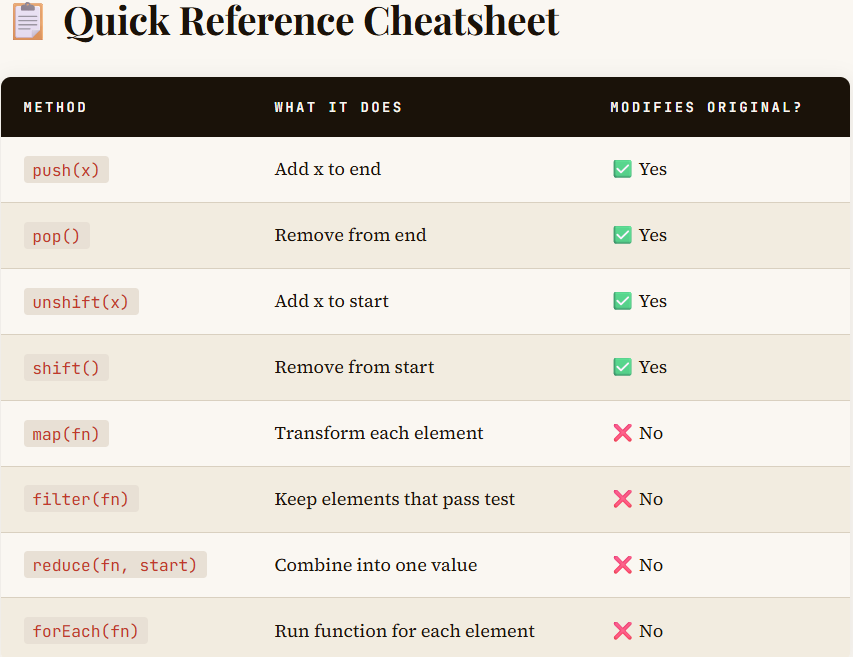
Remember: push() and pop() both modify the original array. The end is where the action happens.
shift() and unshift()
The Queue — adding and removing from the front
Now think of a queue at a ticket counter. A new person joins from the back (unshift... well, actually adds to the front, but bear with the analogy!). The person at the front gets served and leaves (shift). The front is where the action is.
shift() removes the first element. unshift() adds to the beginning.
let queue = ["Alice", "Bob", "Charlie"];

// First person leaves the counter
let served = queue.shift();
console.log(served);   // "Alice"
console.log(queue);    // ["Bob", "Charlie"]

// New person joins at the front (VIP!)
queue.unshift("Zara");
console.log(queue);    // ["Zara", "Bob", "Charlie"]
map()
The Transformer — shape every element into something new
You own a juice factory. You receive a conveyor belt of oranges. Each orange goes through a machine that squeezes it into juice. The same number of items come out — but transformed. That's map(). One item in → one item out. Every single time.
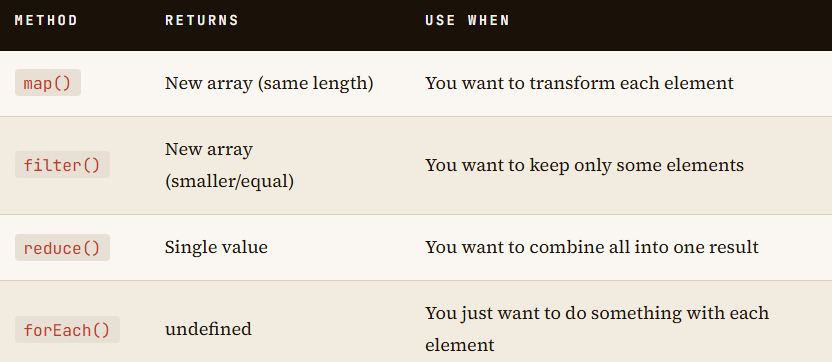
map() creates a brand new array by running a function on every element of the original. The original array is never touched.
The Old Way (for loop)
let prices = [100, 200, 300];
let discounted = [];

for (let i = 0; i < prices.length; i++) {
  discounted.push(prices[i] * 0.9); // 10% off
}

console.log(discounted); // [90, 180, 270]
The map() Way
let prices = [100, 200, 300];

let discounted = prices.map(function(price) {
  return price * 0.9;
});

console.log(discounted); // [90, 180, 270]
console.log(prices);     // [100, 200, 300] ← untouched!
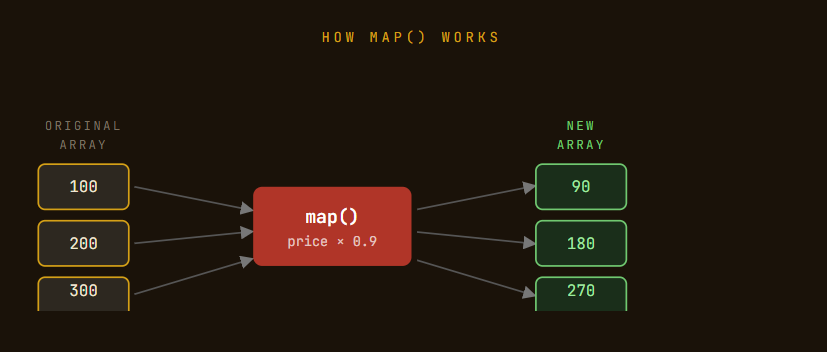
Key Rule: map() always returns an array of the same length as the input. 10 items in → 10 items out. Always.
filter()
The Gatekeeper — keep only what passes the test
At your fruit store again — now you're sorting oranges by size. Only oranges above 150g go to the premium box. Smaller ones get composted. You're not changing the oranges. You're just deciding: does this one make the cut? That's filter().
filter() creates a new array containing only the elements for which your function returns true.
The Old Way (for loop)
let scores = [45, 78, 32, 90, 55];
let passed = [];

for (let i = 0; i < scores.length; i++) {
  if (scores[i] >= 50) {
    passed.push(scores[i]);
  }
}
console.log(passed); // [78, 90, 55]
The filter() Way
let scores = [45, 78, 32, 90, 55];

let passed = scores.filter(function(score) {
  return score >= 50;
});

console.log(passed);  // [78, 90, 55]
console.log(scores);  // [45, 78, 32, 90, 55] ← untouched!
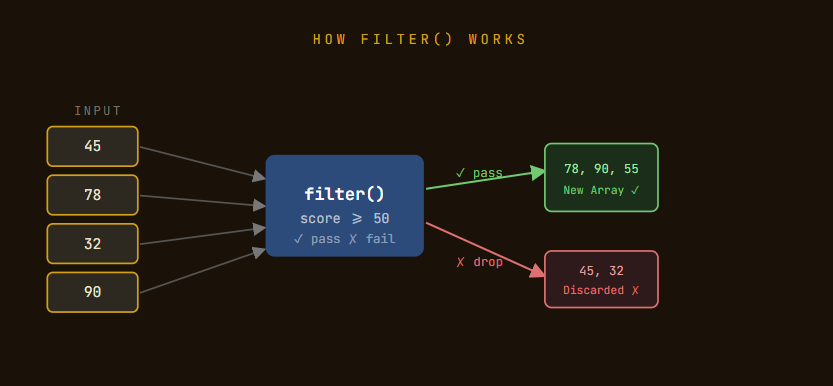
Key Rule: filter() returns an array that is equal to or smaller than the input. If nothing passes the test, you get an empty array [].
**
reduce()**
The Accumulator — boil an entire array down to a single value
You're at the checkout counter. The cashier scans each item one by one. After each scan, the total on the screen goes up. At the end, one final number appears — your bill. That's reduce(). Many values → one result.
reduce() takes all elements of an array and reduces them to a single value. It uses an accumulator — a running total that gets updated with each element.
let cartItems = [120, 50, 80, 200];

let total = cartItems.reduce(function(accumulator, currentItem) {
  return accumulator + currentItem;
}, 0); // ← 0 is the starting value

console.log(total); // 450
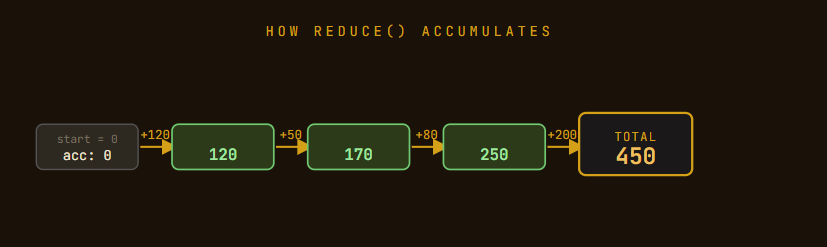
Think of accumulator as your running total, and currentItem as the next thing being added. The 0 at the end is where you start counting from.
**
forEach()**
You have a list of students. You need to send each one an email. You go through the list one by one. You don't create a new list. You don't filter anyone. You just do something for each person. That's forEach().
forEach() runs a function for each element in an array. Unlike map(), it does not return anything. Use it for side effects — logging, updating the DOM, sending emails in our story.
let students = ["Aisha", "Rohan", "Priya"];

students.forEach(function(student) {
  console.log("Welcome to class, " + student + "!");
});

// Welcome to class, Aisha!
// Welcome to class, Rohan!
// Welcome to class, Priya!